 Mirror Curves
Overview
This modifier is the most straightforward of all modifiers, creating a duplicate of existing curves and mirroring them along the object space's X axis.
Parameters
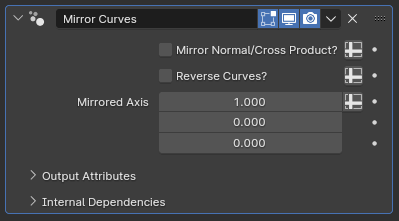
- Mirror Normal/Cross Product?: By default, this parameter is turned off, and the tilt calculation for the mirrored curves will be performed such that the curve normals are also mirrored. If enabled, the tilt calculations will set the curve normals such that their cross product with the curve tangent will be mirrored instead
- Reverse Curves?: If enabled, the mirrored curves will be reversed, and both their normals and cross products will be mirrored. When this is enabled, above parameter has no effect
- Mirrored Axis: Defines the surface normal for the hypothetical plane the curves are mirrored from. The default value of (1,0,0) makes it so curves are mirrored along the X axis
Tips & Use Cases
- While simple, this modifier is very useful overall, as Blender's built-in Mirror modifier can only mirror mesh objects and converts curves to mesh lines comprised only of loose edges
- The order in which modifiers are evaluated has a significant impact on the end result. Having this modifier at the end of your modifier stack will result in absolute symmetry, but having it before Random Trim Curves, Split Curve to Curves or the built-in hair deformation nodes can result in shapes that are symmetrical overall, but still retain small-scale differences for a more natural look